
Crimson Desert – Full Controls List for Both PC and Console


Crimson Desert is a massive game, from the full, expansive, open-world map of Pywel to the dozens of side quests available to complete, to the many locations and cities you can explore and interact with. Because of how massive the game is, there are so many different and complex controls you need to know to better understand how to play the game.
One of the biggest aspects of Crimson Desert is its complex combat system, which has you make different combinations during combat to do maximum damage. You’ll also need to properly time your button pressing to correctly do the combos. Here is the full list of controls you’ll need to memorize for Xbox, PlayStation, and PC for Crimson Desert.
Basic Controls
Here is a list of the basic controls in Crimson Desert. I will also list separate combat controls for PC and consoles. It’s important to note that these are the default controls and can be changed in the controls menu to better suit your playstyle.
| Action | XBOX | PlayStation | PC |
|---|---|---|---|
| Walk | LS | L | W/A/S/D |
| Move Camera | RS | R | Mouse |
| Basic Attack | RB | R1 | Left Click |
| Power Attack | RT | R2 | Right Click |
| Run | Tap A | Tap X | Shift |
| Jump | X | Square | Space |
| Dodge/Roll | B | Circle | Alt |
| Kick/Unarmed | Y | Triangle | F |
| Summon Horse | D-Pad Up | Arrow Up | H |
| Quick Slot 1 (Weapon) | (HOLD) D-Pad Up | (HOLD) Arrow Up | (HOLD) H |
| Sheathe Weapon | D-Pad Left | Arrow Left | T |
| Quick Slot 2 (Misc Gear) | (HOLD) D-Pad Left | (HOLD) Arrow Left | (HOLD) T |
| Food | D-Pad Right | Arrow Right | – |
| Camera Lock | D-Pad Down | Arrow Down | CAPS Lock |
| Crouch/Slide (while running) | LS Click | L3 | C |
| Axion Force | (HOLD) LS | (HOLD) L3 | Tab |
| Force Palm | (HOLD) RS | (HOLD) R3 | (HOLD) Middle Mouse |
| Aim Ranged (Release to Shoot) | LT | L2 | Q |
| Block/Parry/Aim Lantern | LB | L1 | Ctrl |
| Change Camera | View Button | Select Button | – |
| Map | (HOLD) Pause, select map | (HOLD) Pause, select map | – |
Combat Controls for PC
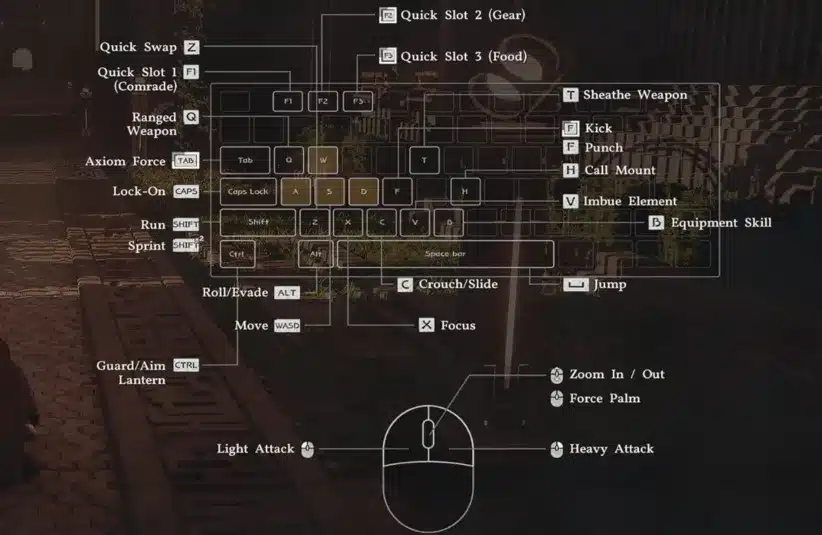
| Action | Button | Input |
| Light Attack | LMB | Press Repeatedly or Hold to Combo |
| Heavy Attack | RMB | Press Repeatedly or Hold to Combo |
| Punch/Kick | F | Press |
| Aim | Q | Press |
| Aim | M4 | Press |
| Fire | LMB | Press (While Aiming) |
| Focus | X | Press |
| Axiom Force | Tab | Press |
| Aim / Guard / Focus Light | Control | Press |
| Aim / Guard / Focus Light | M4 | Press |
| Skill 1 | RMB + LMB | Combo Press |
| Skill 2 | RMB + Control | Combo Press |
| Skill 3 | RMB + L. Shift | Combo Press |
| Skill 4 | LMB + Alt | Combo Press |
| Skill 5 | LMB + Shift | Combo Press |
| Skill 6 | LMB+ Space | Combo Press |
| Skill 7 | LMB + Control | Combo Press |
| Weapon Swap | Z | Press |
| Grappling: Throw | F + LMB | Combo Press |
| Grappling: Lariat | F+ RMB | Combo Press |
| Enemy Vault | Space + LMB | Combo Press |
| Imbue Element | V | Hold |
| Skill: Flame | 1 | Press |
| Skill: Frost | 2 | Press |
| Skill: Lightning | 3 | Press |
| Skill: Wind | 4 | Press |
Combat Controls for Console
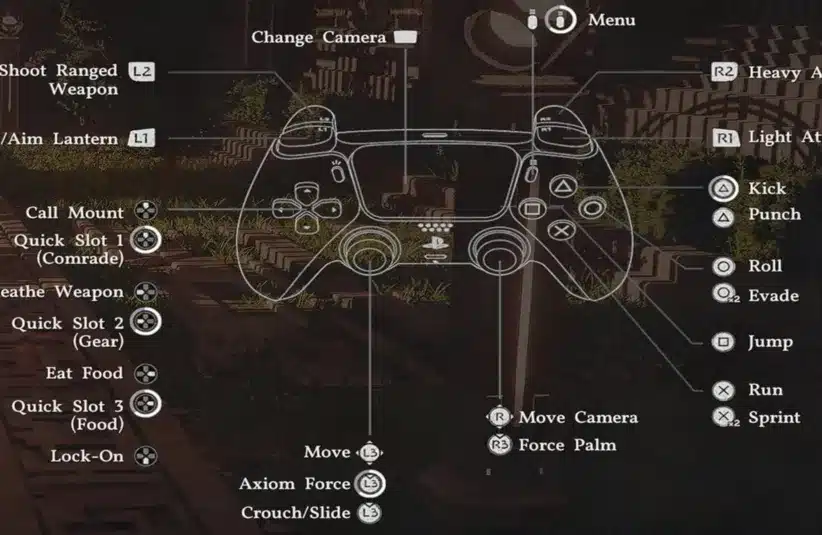
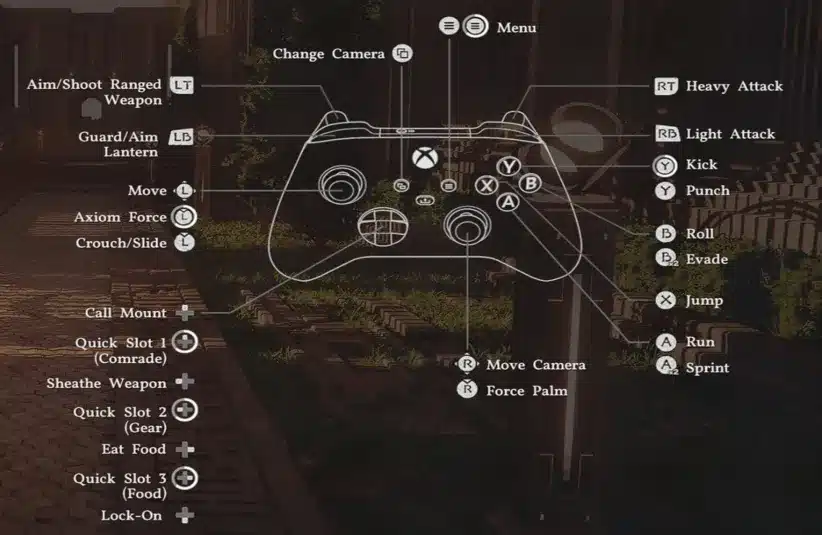
| Action | PlayStation | XBOX | Input |
| Light Attack | R1 | RB | Press Repeatedly or Hold to Combo |
| Heavy Attack | R2 | RT | Press Repeatedly or Hold to Combo |
| Punch/Kick | △ | Y | Press |
| Aim | L2 | LT | Hold |
| Fire | L2 | LT | Release (While Aiming) |
| Focus | X | A | Press |
| Axiom Force | L3 | LS (Press) | Hold |
| Block/Parry | L1 | LB | Press |
| Skill 1 | R2 + R1 | RT + RB | Combo Press |
| Skill 2 | R2 + L1 | RT + LB | Combo Press |
| Skill 3 | R2 + X | RT + A | Combo Press |
| Skill 4 | R1 + ⭘ | RB + B | Combo Press |
| Skill 5 | R1 + X | RB + A | Combo Press |
| Skill 6 | R1 + ☐ | RB + X | Combo Press |
| Skill 7 | R1 + L1 | RB + LB | Combo Press |
| Grappling: Throw | △ + R1 | Y + RB | Combo Press |
| Grappling: Lariat | △ + R2 | Y + RT | Combo Press |
| Enemy Vault | ☐ + R1 | X + RB | Combo Press |
Author
