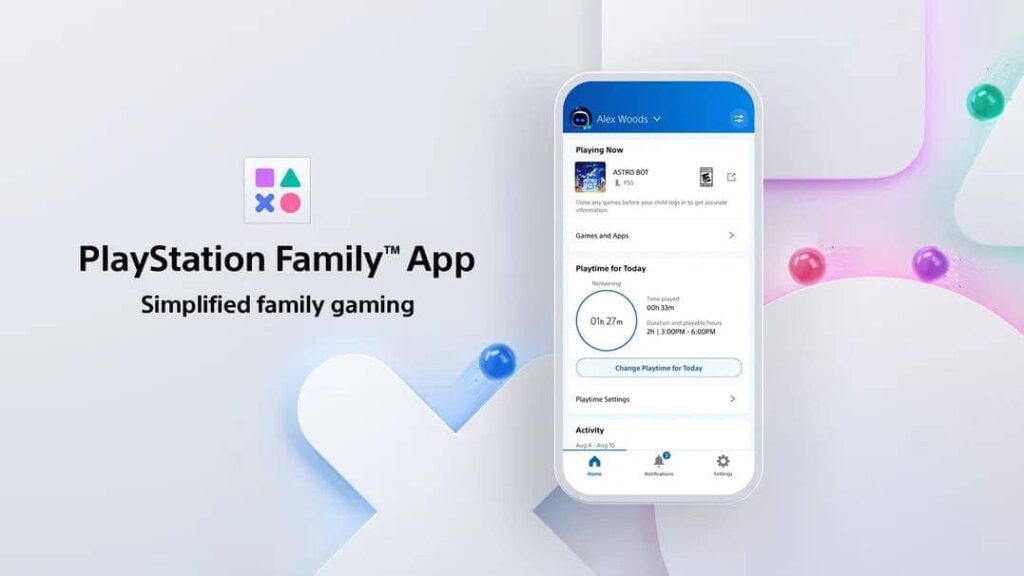
Sony’s finally giving parents a proper toolkit with the launch of the PlayStation Family App—a mobile-first control center for managing your kid’s gaming habits without needing to wrestle with console menus or vague system settings. Available now on iOS and Android, the app turns parental controls into something actually usable, with real-time notifications, activity reports, and playtime approvals all baked into a clean interface.
Guided Setup That Doesn’t Feel Like a Tax Form
The onboarding flow is designed to walk parents through setting up a child account without the usual console-side friction. It’s guided, intuitive, and doesn’t assume you’ve memorized your PSN password from 2014.
Real-Time Oversight Without Hover Parenting
Parents get pinged the moment a child launches a game, requests extra playtime, or tries to access restricted content. You can approve or deny from your phone—no need to boot up the console or interrupt your own session. It’s control without micromanagement.
Activity Reports That Actually Mean Something
Daily and weekly breakdowns show what your kid’s been playing and for how long. It’s not just raw data—it’s context. You’ll know if they’re grinding through Minecraft or speedrunning God of War, and you can adjust limits accordingly.
PlayStation FamilyPlaytime Management That’s Flexible, Not Fragile
Set limits by day, approve extensions on the fly, and keep the system dynamic. Kids can request more time directly from the console, and parents can respond from anywhere. It’s a negotiation system, not a lockdown.
Spending Controls That Don’t Feel Like a Trap
Add funds, set monthly limits, and monitor purchases—all from the app. No more surprise charges for digital skins or in-game currency. You’re the bank, and the vault’s finally mobile.
Content Filters That Actually Work
Age-based presets make it easy to block inappropriate content, but everything’s customizable. You can fine-tune settings per child, per game, or per mood. It’s granular without being overwhelming.
Social Settings That Respect Boundaries
Control how your kids interact online—who they can talk to, what they can share, and how they show up in multiplayer spaces. It’s privacy-first, with toggles that actually do what they say.
Bottom line: the PlayStation Family App is Sony’s overdue answer to modern parenting in a digital gaming world. It’s modular, mobile, and finally makes console oversight feel like a feature—not a chore. Whether you’re managing screen time, spending, or social access, this app gives you the tools without the friction.
 Don't stop here
Every Score. Every Story. One Home.
Breaking sports, entertainment and news from across the Total Apex network, updated all day.
Get the Full Story →
Don't stop here
Every Score. Every Story. One Home.
Breaking sports, entertainment and news from across the Total Apex network, updated all day.
Get the Full Story →